
The overall objective of ERN TransplantChild is to create a new, rational, efficient, interoperable, open, accessible paediatric transplant registry for all type of paediatric transplantation that allows generating real world evidence monitoring by the identification of common outcomes for all types of transplant, and which can be used as a model to support care and research for the benefit of patients, improvement of the transplanted patient healthcare, their life expectancy and long-term quality of life of children and their families.
PETER
PaEdiatric Transplantation European Registry
The PETER registry is now fully operational. If you want to access the registry, or simply learn more about our mission and objectives, visit the web of the registry:
Follow the link below to find some important documents regarding the use of PETER. If you are a user of the registry, make sure you are familiar with them:
If you have any questions about the PETER registry, feel free to contact us at peter@transplantchild.eu.
PETER Quick Guides:
1. Enrolling a new patient
How to enrol a new patient
Follow the instructions below:
1. In the Projects window, select PETER.
2. Click on Patient Information.
3. Click New Patient at the top right of the screen.
4. Click Save and confirm in the opening window.
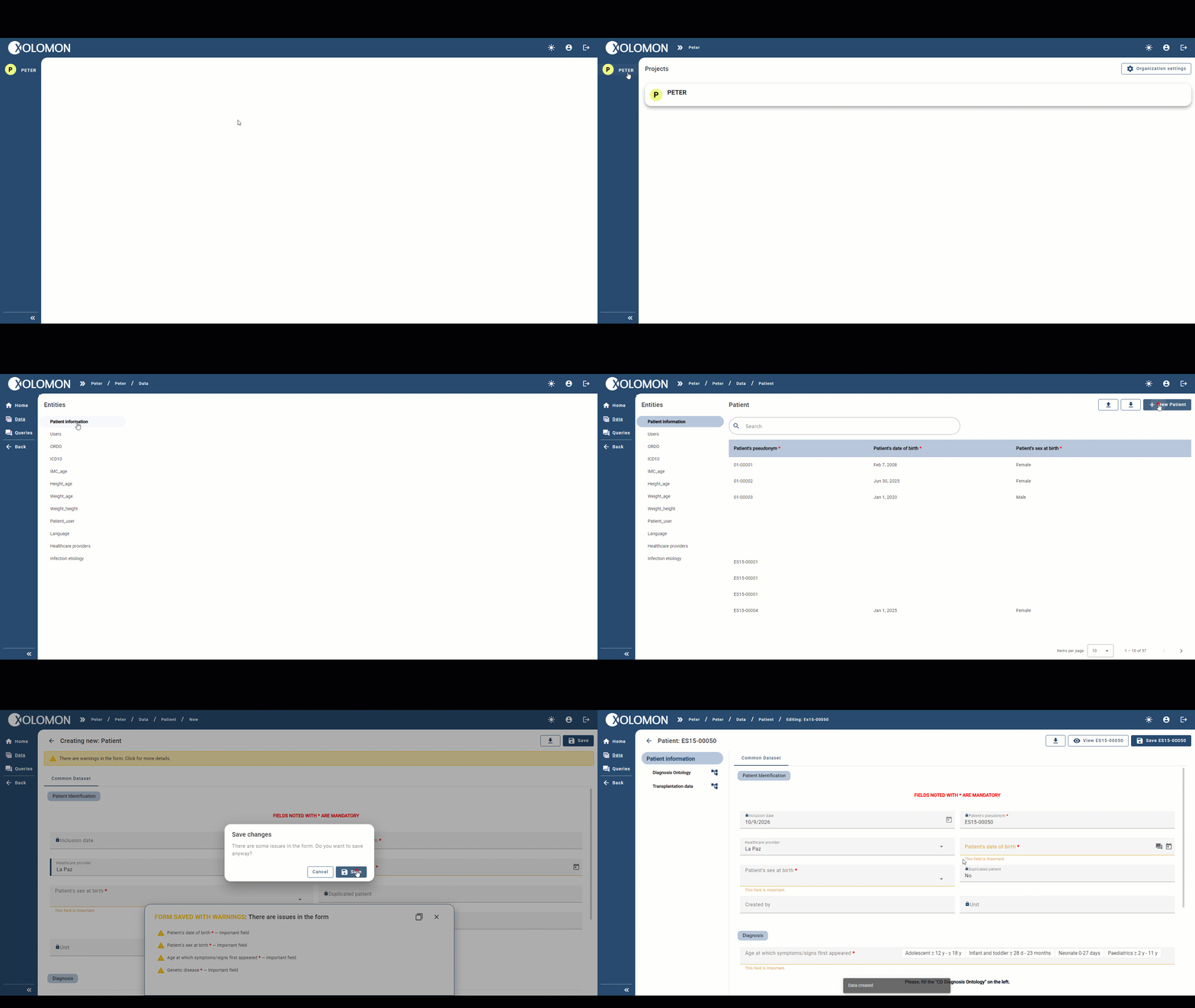
✓ The patient is now created and their pseudonym assigned.
! NOTE: You don’t need to fill in any field to create the patient.